Title here
Summary here
GB-Link is a hardware adapter that connects an original Game Boy, Game Boy Color, or Game Boy Advance to your computer or Android phone over USB. It brings classic link cable multiplayer online and unlocks browser-based tools that extend what the original hardware could do on its own.
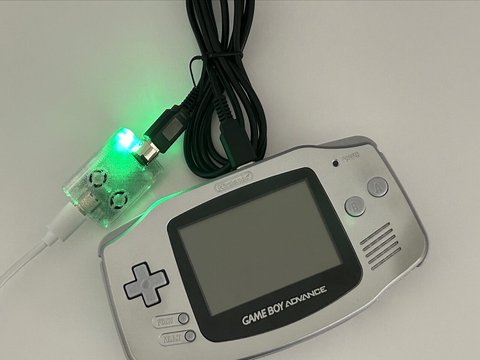
Some of the most memorable Game Boy games were built around the link cable between 2 players that were physically in the same room. Pokémon trading and battling, Tetris head-to-head, Advance Wars multiplayer, and many other modes all depend on two consoles wired together. You always needed a second player, a second console, the right cartridges, and a link cable — all in the same place at the same time.
GB-Link removes the location requirement. Connect your console to a friend across the world and play in real time. Companion web tools go further — backing up cartridge saves, printing Game Boy Camera photos to your screen, loading GBA homebrew without a flash cart, and more.
No drivers or desktop apps are required. Everything runs in the browser using WebUSB (Chrome/Edge) and WebSerial (Firefox).
| Category | Examples |
|---|---|
| Online multiplayer | Pokémon Gen 3, Pokémon Trading (Gen 1–2), Tetris, Advance Wars, Dr. Mario, Yoshi |
| Trading | Pokémon Trading (Gen 1–2), Pokémon Gen 3 |
| Utilities | Pokémon Event Distribution, Game Boy Printer, GBA Multiboot, GB Cart Doctor |
Get help, find players, and follow project news on Discord. Demos and walkthroughs are on the YouTube channel. For hardware, updates, and the official store links, visit gblink.io.
Want to dig into the firmware or contribute code? Head to the Developers section.
See GB-Link in action on the official YouTube channel:
Game-specific demos are linked from each page in Games & Tools.